The previous post ended with a list of things that example could not do, and most of them had the same root cause: everything was hardcoded. The region, the AMI ID, the instance type, the resource names. Running it for a second environment meant editing .tf files, which is not configuration, it is copy-paste.
This example fixes that. The code is in TerraformExamples, and by the end of it not one AMI ID, region or resource name appears literally inside a resource block.
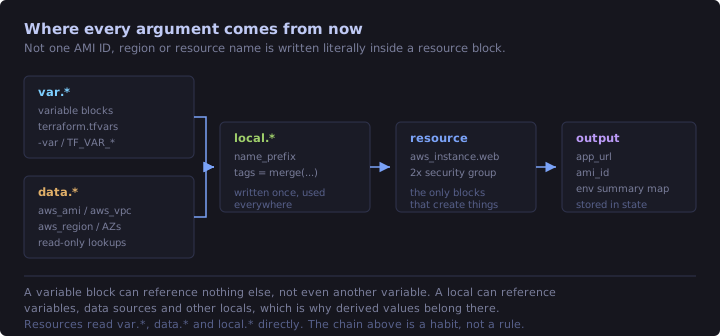
Four new block types do the work.
| Block | Direction | Purpose |
|---|---|---|
variable "..." { } |
in | Values you pass into the configuration |
data "..." "..." { } |
in | Values Terraform looks up from the provider |
locals { } |
internal | Named expressions computed once and reused |
output "..." { } |
out | Values the configuration hands back to you |
What gets created is one EC2 instance running nginx plus two security groups, one for SSH and one for HTTP, in the region's default VPC. Three resources, same as before plus one.
Pre-requisites
Everything from the last post still applies, so this is only what changed.
- A default VPC has to exist in the target region. Last time that was a soft requirement. Now the
aws_vpcdata source looks it up explicitly, and the plan fails if there isn't one. - No AMI ID needed. That is the entire point of the data source below.
- An EC2 key pair is optional, but this is the first example you can actually SSH into, so create one in the console if you want to try that.
How the files are laid out
terraform-manifests/
├── c1-versions.tf          # terraform + provider blocks
├── c2-variables.tf         # input variables
├── c3-locals.tf            # local values
├── c4-datasources.tf       # AMI, VPC, AZs, caller identity, region
├── c5-securitygroups.tf    # SSH + web security groups
├── c6-ec2instance.tf       # EC2 instance
├── c7-outputs.tf           # output values
├── terraform.tfvars        # auto-loaded variable values
├── qa.tfvars               # NOT auto-loaded, used with -var-file
└── webserver-install.sh    # user data
Terraform still concatenates all of these, so the split is for humans only. Inside c1-versions.tf only one line changed:
provider "aws" {
  region = var.aws_region
}
The provider block can read variables. The terraform block above it still cannot, because it is evaluated before variables exist. That asymmetry catches people out, so it is worth saying once: required_version and required_providers take literals, always.
Input variables
A variable block declares a parameter. The label is the name, and you read it elsewhere as var.<name>.
variable "instance_type" {
  description = "EC2 instance type"
  type        = string
  default     = "t3.micro"
}
Three arguments matter:
descriptionis documentation. It shows up in interactive prompts and in generated docs. Write one every time, even when the name looks obvious to you today.typeis a constraint. Terraform rejects a wrong-typed value before it touches AWS.defaultmakes the variable optional. Leave it out and the variable becomes required.
Required versus optional
ssh_ingress_cidrs deliberately has no default:
variable "ssh_ingress_cidrs" {
  description = "List of CIDR blocks allowed to reach port 22"
  type        = list(string)
}
With no value supplied anywhere, terraform plan stops and prompts for it interactively, which is exactly what you do not want in CI. Here terraform.tfvars supplies it. Making a variable required is a design decision rather than an oversight: it forces whoever runs this to think about a value that has no safe default, and "who is allowed to SSH into my box" is that kind of value.
Types
| Category | Types | Example |
|---|---|---|
| Primitive | string, number, bool |
"t3.micro", 2, true |
| Collection | list(T), set(T), map(T) |
["a", "b"], { env = "dev" } |
| Structural | object({...}), tuple([...]) |
{ name = "x", size = 2 } |
| Escape hatch | any |
anything, and you lose the checking |
A few things about those that are not obvious from the table:
- A
listis ordered and allows duplicates. Asetis unordered and deduplicated. Use a set when order genuinely means nothing, like a bag of CIDRs. map(string)constrains the values, not the keys. Keys are always strings.- Terraform converts where it safely can, so
"2"becomes anumberand1becomes"1". It will not invent a list from a string. anyis technically valid, and I would still avoid it. It turns a type error at plan time into a provider error half way through an apply.
null, an argument you can switch off
variable "instance_keypair" {
  description = "Name of an existing EC2 key pair to attach, or null for none"
  type        = string
  default     = "hiren-test"
}
Assigning null to a resource argument means "behave as if I never wrote this argument", so the provider default applies. That is how key_name on the instance attaches a key pair only when you name one, with no count tricks and no second resource block.
null is not the same as "". An empty string is a real value that the provider will try to use, and for key_name that means an API error about a key pair that does not exist.
The default committed in the repo is my own key pair name, because that is what I test with. Set it to null or to your own key pair before you apply, otherwise the plan fails on a key pair that is not in your account.
Validation
variable "environment" {
  description = "Environment name, used in resource names and tags"
  type        = string
  default     = "dev"

  validation {
    condition     = contains(["dev", "qa", "prod"], var.environment)
    error_message = "environment must be one of: dev, qa, prod."
  }
}
The condition is a boolean expression that may only reference this one variable. It runs during plan, before any API call, so a typo fails in about a second instead of half way through creating things. Try it:
terraform plan -var="environment=staging"The patterns you will write over and over are contains([...], var.x), can(regex("...", var.x)), length(var.x) > 0 and can(cidrnetmask(var.x)).
There is also sensitive = true, which this example does not use. It makes Terraform print (sensitive value) instead of the real one in plan and apply output. It is not encryption. The value still sits in plaintext in terraform.tfstate, which is the actual argument for an encrypted remote backend rather than for sprinkling sensitive around.
Supplying values, and who wins
There are six ways to set a variable, and they do not all carry the same weight.
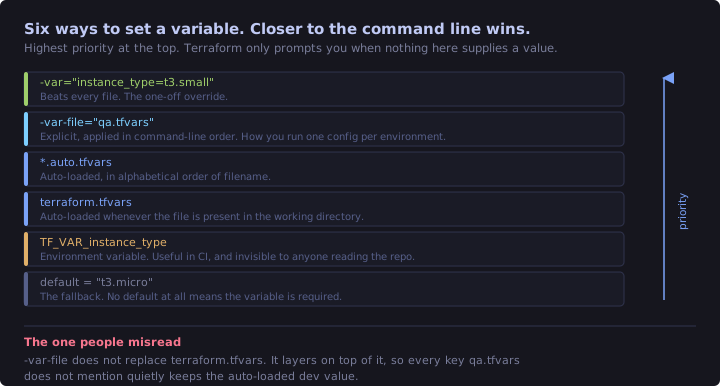
The rule to memorise is that closer to the command line wins. Interactive prompts only happen when a required variable is not covered by any of them. The environment variable form is $env:TF_VAR_instance_type = "t3.small" in PowerShell, or export TF_VAR_instance_type=t3.small on macOS and Linux.
terraform.tfvars in this folder is picked up on its own:
aws_region        = "us-east-1"
environment       = "dev"
project_name      = "tfdemo"
instance_type     = "t3.micro"
ssh_ingress_cidrs = ["0.0.0.0/0"]
qa.tfvars is not, because the filename is neither terraform.tfvars nor *.auto.tfvars. You name it explicitly, and that is the standard way to run one configuration against several environments:
# dev, terraform.tfvars is picked up automatically
terraform plan

# qa, terraform.tfvars still loads first and qa.tfvars overrides on top
terraform plan -var-file="qa.tfvars"

# one-off override, beats every file
terraform plan -var="instance_type=t3.small"
That second command is the one people misread. -var-file does not replace terraform.tfvars, it layers on top of it, so anything qa.tfvars does not mention keeps the auto-loaded dev value. qa.tfvars here only sets four keys and still gets project_name from the auto-loaded file.
Both tfvars files are committed in this repo so the example runs as-is, and neither contains anything secret. Real projects usually gitignore *.tfvars and commit a terraform.tfvars.example that documents the expected keys.
Locals
A variable is an input. A local is an internal name for an expression, and nothing outside the configuration can override it.
locals {
  name_prefix = "${var.project_name}-${var.environment}"

  tags = merge(
    var.common_tags,
    {
      Environment = var.environment
      Project     = var.project_name
      Region      = data.aws_region.current.name
    }
  )
}
You read these as local.name_prefix. The block you declare them in is locals, plural, and the reference is local., singular. Getting that round the wrong way is a five-minute debugging session the first time.
Two things are happening in there:
- String interpolation.
"${...}"embeds an expression in a string, givingtfdemo-dev. Every resource name is built from that prefix, so switching environment renames everything consistently instead of leaving half the resources calleddevin your qa account. merge()combines maps left to right, with later keys overwriting earlier ones. This is the idiomatic tagging pattern: shared tags defined once, per-resource extras added at the call site.
tags = merge(local.tags, { Name = "${local.name_prefix}-web" })Deciding between a local and a variable is simple enough. If the caller should be able to change it, it is a variable. If it is derived from other values and only exists so you stop repeating yourself, it is a local. Locals can also reference variables, data sources and other locals, and variables can reference none of those.
Data sources
A resource block says "make this exist". A data block says "go find this and tell me about it". Data sources are read-only, they create and destroy nothing, and they never show up as + create in a plan.
You address them as data.<TYPE>.<NAME>.<ATTRIBUTE>. The leading data. is the only thing distinguishing them from a resource reference.
The AMI lookup
data "aws_ami" "amazon_linux" {
  most_recent = true
  owners      = ["amazon"]

  filter {
    name   = "name"
    values = ["al2023-ami-2023.*-x86_64"]
  }

  filter {
    name   = "root-device-type"
    values = ["ebs"]
  }

  filter {
    name   = "virtualization-type"
    values = ["hvm"]
  }
}
Used as ami = data.aws_ami.amazon_linux.id, which kills off the hardcoded ami-0b826bb6d96d2afe4 from last time. It also kills two genuine problems, because AMI IDs differ per region and AWS deregisters old ones eventually.
Things worth understanding here:
- Separate
filterblocks are ANDed. Multiplevaluesinside one block are ORed. most_recent = truepicks the newest match. Without it, more than one match is an error rather than a coin toss.ownersis not optional in practice. Anyone can publish an AMI with any name, so always pin it to"amazon","self"or an account ID. That is a real supply chain concern and not box-ticking.- "Latest" cuts both ways. The AMI ID can change between applies, and a changed
amiforces instance replacement. Fine for a demo, dangerous in production, where you pin an exact ID in a variable or read it from SSM Parameter Store.
Run terraform plan and the resolved AMI ID appears right there in the plan, before anything is created.
Looking up infrastructure somebody else owns
data "aws_vpc" "default" {
  default = true
}
The security groups now set vpc_id = data.aws_vpc.default.id instead of relying on the implicit default. Same result today, but it is the pattern you need the moment the VPC is created by another team or another Terraform configuration.
Data sources fail loudly. If no default VPC exists in the region, this errors with "no matching VPC found" during plan. That is the intended behaviour, and it is why a data source doubles as an assertion that something exists.
Context data sources
data "aws_availability_zones" "available" { state = "available" }
data "aws_caller_identity" "current" {}
data "aws_region" "current" {}
These take almost no arguments and describe the context the provider is operating in. aws_caller_identity is the Terraform equivalent of aws sts get-caller-identity, and it is the usual way to build ARNs or add a guard rail that refuses to apply into the wrong account.
When they get read
- With no unknown arguments, they are read during
planand their values appear in the plan output. - If an argument depends on something that does not exist yet, the read is deferred to
applyand the plan shows(known after apply). terraform plan -refresh-onlyre-reads them without proposing changes.
One more data source is worth knowing about before you need it. terraform_remote_state reads outputs from another Terraform state file, which is the classic way to consume a networking stack's VPC and subnet IDs from an application stack.
Outputs
Outputs are the return values of a configuration. They print after apply, they are queryable with terraform output, and they get stored in state.
output "instance_public_ip" {
  description = "Public IP address of the EC2 instance"
  value       = aws_instance.web.public_ip
}
Any expression works as a value, not just a bare attribute:
output "app_url" {
  value = "http://${aws_instance.web.public_dns}/"
}

output "environment_summary" {
  value = {
    environment = var.environment
    region      = data.aws_region.current.name
    name_prefix = local.name_prefix
    instance    = var.instance_type
  }
}
Grouping related values into one map output beats adding ten scalar ones. Reading them back:
terraform output                          # all of them
terraform output -raw instance_public_ip  # one value, unquoted, good for piping
terraform output -json                    # types preserved, for scripting
Outputs are a contract, not a printout
Printing values after apply is the least interesting thing an output does. The reason every module on the registry ships an outputs.tf is that an output is the documented, machine-readable interface of a configuration.
It is the module interface. Once a directory becomes a reusable module, outputs are the only way the caller can see inside it. Resources in a child module are invisible to the parent, and module.vpc.aws_subnet.private.id simply is not a valid address.
# modules/vpc/outputs.tf
output "private_subnet_ids" {
  value = aws_subnet.private[*].id
}

# root main.tf
module "app" {
  source     = "./modules/app"
  subnet_ids = module.vpc.private_subnet_ids # only possible because of the output
}
Variables are a module's inputs and outputs are its return values, the same relationship as function parameters and return.
It is how separate state files talk to each other. Real projects split state per layer so a mistake in one cannot damage another, and outputs are the wiring between layers:
data "terraform_remote_state" "network" {
  backend = "s3"
  config = {
    bucket = "acme-tfstate"
    key    = "network/terraform.tfstate"
    region = "us-east-1"
  }
}

resource "aws_instance" "app" {
  subnet_id = data.terraform_remote_state.network.outputs.private_subnet_ids[0]
}
Whatever the networking layer exports is its published API. Anything it does not export stays private, and its owners are free to change it.
It is the handoff into whatever runs after apply. The pipeline stage after apply needs values Terraform just learned:
URL=$(terraform output -raw app_url)
curl --fail --retry 10 --retry-delay 5 "$URL"

terraform output -json > infra.json
Prefer -json in scripts. It keeps types intact, so a list stays a list instead of becoming a string that looks like one. The environment_summary map output above is shaped for exactly this.
It is what tests assert against, because it is the only stable surface a configuration exposes:
# tests/basic.tftest.hcl
run "ami_lookup_succeeds" {
  command = plan
  assert {
    condition     = output.ami_id != ""
    error_message = "AMI lookup returned nothing"
  }
}
Two properties make all of that work. Outputs live in state, so terraform output answers instantly without an AWS API call, and they are recomputed on every apply so they never go stale. Adding an output and nothing else still needs an apply, because it is a change to state even though nothing in AWS moves.
Running it
terraform init
terraform validate
terraform plan
terraform apply
Worth stopping to look at rather than scrolling past:
- The plan reads
3 to add, 0 to change, 0 to destroy, two security groups and the instance. - The AMI ID is a concrete value in the plan, already resolved, because data sources are read before the plan is built.
data.aws_vpc.defaultand friends appear as reads and never as+ create.- Resource names carry the
tfdemo-devprefix thatlocalsbuilt. - After apply,
terraform state listshowsdata.entries sitting alongside the managed resources.
Then exercise the variable mechanics properly:
# same config, qa values, note the renamed resources and t3.small in the diff
terraform plan -var-file="qa.tfvars"

# validation failure, in about a second
terraform plan -var="environment=staging"
And when an expression is not producing what you expected, terraform console beats guessing:
terraform console
> local.name_prefix
> data.aws_ami.amazon_linux.name
> merge(var.common_tags, { Name = "x" })
> exit
Opening it in a browser
terraform output -raw app_urlThen browse to http://<PUBLIC-DNS>/ and http://<PUBLIC-DNS>/metadata/instance-identity.html. Same caveat as last time, apply finishing means the instance exists and not that nginx has finished installing, so give user data a minute.
SSH, finally
This is the first example you can log into, because two things are in place that were missing before: key_name on the instance, from var.instance_keypair, and a security group opening port 22 to var.ssh_ingress_cidrs. Either one on its own gets you nowhere.
terraform output -raw instance_public_ip

ssh -i "D:\SSH\<key-pair-name>\<key-pair-name>.pem" ec2-user@<PUBLIC-IP>
The default login user depends on the AMI family. It is ec2-user on Amazon Linux and RHEL, ubuntu on Ubuntu, admin on Debian. The wrong one gives you Permission denied (publickey) with a perfectly good key, which sends you off debugging the wrong thing.
UNPROTECTED PRIVATE KEY FILE on Windows
OpenSSH refuses to use a private key that other accounts can read. A .pem downloaded to a data drive usually looks like this:
icacls "D:\SSH\my-key\my-key.pem"my-key.pem HIREN\myuser:(R)
BUILTIN\Administrators:(F)
NT AUTHORITY\SYSTEM:(F)
NT AUTHORITY\Authenticated Users:(M) <- ssh rejects this
BUILTIN\Users:(RX) <- and thisThe fix everybody posts is this one:
icacls "D:\SSH\my-key\my-key.pem" /inheritance:r /grant:r "$($env:USERNAME):(R)"It is frequently a no-op, and it fails silently. /inheritance:r removes inherited ACEs only. If those group entries are explicit on the file, which is common for files created outside your user profile, they survive it and ssh keeps refusing. Re-run icacls to check, and if the same entries are still listed, delete them by name:
icacls "D:\SSH\my-key\my-key.pem" /remove:g "NT AUTHORITY\Authenticated Users" "BUILTIN\Users"A key OpenSSH accepts ends up with your account plus SYSTEM and Administrators, and nothing else:
my-key.pem   HIREN\myuser:(R)
             BUILTIN\Administrators:(F)
             NT AUTHORITY\SYSTEM:(F)
The macOS and Linux version of that entire dance is chmod 400 my-key.pem.
Once you are in, the log that user data problems always come back to is worth knowing by heart:
sudo cat /var/log/cloud-init-output.log

systemctl status nginx
cat /etc/os-release   # confirms the instance really is the AMI the data source picked
One security note before you leave this running. ssh_ingress_cidrs is ["0.0.0.0/0"] in the committed tfvars so the example works anywhere, which means port 22 is open to the entire internet. Narrow it to your own address, which curl -s ifconfig.me will tell you, and re-apply:
terraform apply -var='ssh_ingress_cidrs=["203.0.113.7/32"]'Cleaning up
terraform destroyThen the local working files, keeping .terraform.lock.hcl committed.
Remove-Item -Recurse -Force .terraform
Remove-Item -Force terraform.tfstate*
On macOS and Linux:
rm -rf .terraform
rm -rf terraform.tfstate*
Data sources need no cleanup, since nothing was created for them.
Revision checklist
variabletakesdescription,typeanddefault, and is read asvar.name. No default means required, and Terraform prompts if nothing supplies a value.- Types:
string,number,bool;list(T)is ordered and allows duplicates,set(T)is unordered and unique,map(T)is keyed by strings;object({...})for structured input. Avoidany. nullon a resource argument means "pretend I never wrote this argument". Different from"".validationis a booleanconditionon that one variable with a customerror_message, checked at plan time.sensitive = truemasks CLI output only. State still holds the plaintext.- Precedence, low to high:
default,TF_VAR_*,terraform.tfvars,*.auto.tfvarsalphabetically,-var-file,-var. Closer to the command line wins, and-var-filelayers on top ofterraform.tfvarsrather than replacing it. localsare named expressions, declared in alocalsblock and read aslocal.x. They can reference variables, data sources and other locals, and cannot be overridden from outside.merge()combines maps left to right with later keys winning.merge(local.tags, { Name = "..." })is the tagging idiom.datais a read-only lookup addressed asdata.TYPE.NAME.ATTR. It never appears as+ create, and it errors when nothing matches, which makes it an assertion.aws_ami:filterblocks are ANDed andvaluesinside one are ORed,most_recent = truebreaks ties, always setowners, and "latest" can change the ID between applies and force replacement.- Context data sources:
aws_caller_identityfor the account, plusaws_region,aws_availability_zonesandaws_vpc { default = true }. outputvalues are stored in state.terraform output -raw NAMEfor one value,-jsonfor scripting, and group related values into a map output.- Outputs are a contract: the only way a parent reads a child module's values, how separate state files consume each other through
terraform_remote_state, the handoff into CI, and what tests assert against. terraform consoleevaluates expressions interactively against real state.- SSH needs two things,
key_nameon the instance and port 22 open in a security group. On Windows,icacls /inheritance:ronly strips inherited ACEs, so remove explicit group entries by name and verify by re-runningicacls.
What this example still does not do
- There is still exactly one instance, until
countandfor_eachshow up. - Repeating an
ingressblock per port is still manual, whichdynamicblocks fix. - Nothing here is reusable from another configuration yet, because it is not a module.
- State still sits on one machine, so remote backends with locking are still ahead.
- The AMI is looked up as "latest", which is the convenient answer rather than the production one.