The first post was about driving a session well. The second was about teaching it your conventions in files. Both assume the same thing: you are sitting in front of it, in one window, on one machine.
This one drops that assumption. Everything below is about connecting Claude Code to things it did not ship knowing about, packaging your setup so it travels, and letting work happen when you are not there. That last part is the one worth being careful with, so it gets the longest section.
MCP servers
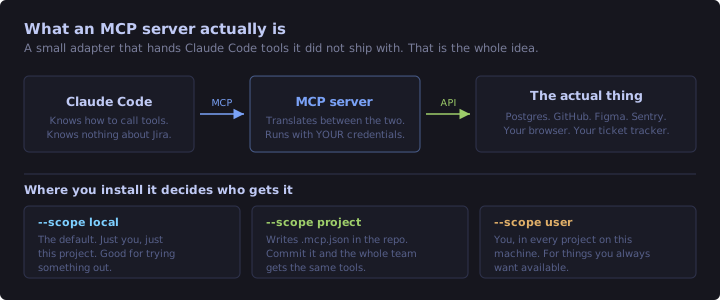
MCP is an open standard for handing an AI tool new capabilities. Strip away the acronym and an MCP server is a small adapter: Claude Code knows how to call tools, it knows nothing about your Jira instance, and an MCP server sits in the middle translating.
The signal that you want one is simple. If you are copying data out of another tool and pasting it into chat, that tool wants an MCP server.
Adding one
# A remote server over HTTP
claude mcp add --transport http notion https://mcp.notion.com/mcp

# A local one that runs as a process, everything after -- is the command
claude mcp add --env API_KEY=xxx --transport stdio airtable -- npx -y airtable-mcp-server
The -- in the second form matters and it trips people up. It separates Claude Code's own flags from the command that starts the server. Everything after it gets passed through untouched.
The scope flag decides who gets the server:
| Scope | Where it is stored | Use it for |
|---|---|---|
local (default) |
Your machine, this project only | Trying something out |
project |
.mcp.json in the repo |
Tools the whole team should have |
user |
Your machine, every project | Things you always want available |
--scope project is the interesting one, because .mcp.json gets committed. Somebody clones the repo and has the same database and issue-tracker access configured as you do, without a setup document that goes stale. Claude Code asks before trusting servers defined in a repo you have just cloned, which is the right default.
The example I actually use
The Chrome MCP server is what I use to check these posts before publishing. I run the site locally, Claude Code drives an actual browser tab, loads the rendered page, and reports back on what it sees. That is how the diagrams in these three posts got caught overflowing their containers: not by me squinting at markdown, but by something loading the page and looking.
That is the shape where MCP earns its keep. Not "chat with your database", but closing a loop that previously required a human to be the messenger.
The part to be careful about
An MCP server runs with your credentials. If you give it a database connection string, it has your database. The tools it exposes also land in your context window at session start, so a chatty server with forty tools is a permanent tax on your context budget.
Treat adding one exactly like adding an npm dependency. Look at who wrote it. Prefer servers from the official directory. Do not install the one you found in a comment thread because it looked convenient.
Plugins
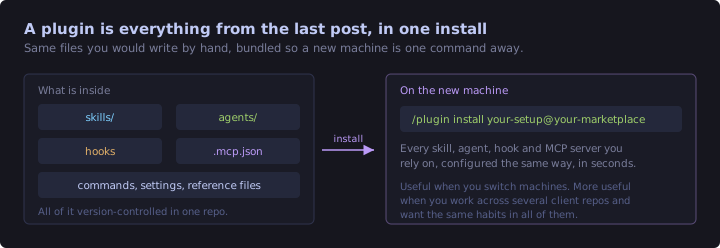
Everything in the previous post was a file you write by hand. A plugin is those files bundled into one installable unit: skills, subagents, hooks, MCP server configuration, settings, all in a single repo.
You install from a marketplace, which is just a repo listing plugins. The official one, claude-plugins-official, is available the moment you start Claude Code, so there is nothing to add first:
/plugin                                       # browse the Discover tab
/plugin install github@claude-plugins-official
/reload-plugins                               # activate without restarting
Other marketplaces you add yourself, and the owner/repo shorthand covers GitHub:
/plugin marketplace add anthropics/claude-plugins-communityOne detail worth knowing before you install anything, because it ties straight back to the first post: the plugin details pane shows a context cost estimate. A plugin is not free. It adds skills, and possibly MCP tool definitions, to every turn of every session. Read that number before installing something you are only mildly curious about.
I have frontend-design installed from the official marketplace, which is a good illustration of the trade. It arrived as one command and brought a set of design-related capabilities with it. I did not write any of it, and I also did not read all of it, which is worth being honest about. Same caution as MCP servers applies.
The more interesting direction is outward. If you work across several client repos, or you set up a new machine more than once a year, your own conventions are exactly the sort of thing that should be a plugin. The rules and skills from the last post are already files in a folder. Packaging them means a fresh machine goes from empty to working-the-way-you-do in one command, instead of an afternoon of copying files and half-remembering what was in them.
Output styles and the status line
Two small things that change the experience more than they should.
Output styles change how Claude writes back to you. If the default register is not what you want, this is the setting rather than repeating "be more concise" in every CLAUDE.md.
The status line is a shell command whose stdout gets rendered under your prompt. That is the entire contract, which makes it far more flexible than it first appears. Claude Code pipes session state in as JSON, your script prints a string, that string is your status line.
Mine lives at ~/.claude/statusline-command.sh and shows the directory and git branch, the model, a context-window meter, and how much of the five-hour and seven-day rate limit windows are used up with countdowns to reset:
{
  "statusLine": {
    "type": "command",
    "command": "bash ~/.claude/statusline-command.sh"
  }
}
The context meter is the part that earns its place. Everything in the first post about context rot depends on noticing that the window is filling, and /context only tells you when you remember to ask. Putting the number permanently on screen turns a thing you check into a thing you see.
Two gotchas from writing that script, both Windows-specific and both non-obvious. A native Windows jq build emits CRLF, so every value carries a trailing carriage return and every numeric comparison silently fails until you strip it. And context_window.used_percentage is null early in a session and again right after a /compact, so anything reading it needs a fallback or your status line goes blank at exactly the moments you were watching it.
Headless mode
claude -p runs a prompt non-interactively and prints the result. This is the bridge from "a thing I type into" to "a thing my build calls".
claude -p "list any .tf file that has a hardcoded AMI id, one per line"

# machine-readable, for piping into something else
claude -p "..." --output-format json
The output formats are text, json, and stream-json. Use json the moment another program is consuming it.
Where this genuinely pays off is checks that are too fuzzy for a linter but too tedious for a person. A linter can tell you a Terraform file will not parse. It cannot tell you that a module's variable descriptions have drifted from what the variables actually do. That second one is a claude -p away, and it can run in CI.
One caution learned the expensive way: a headless run inherits your permission settings. Combining -p with a permissive mode in a script is how you end up with something that made changes nobody reviewed. Pair headless mode with the guardrails section below, not with bypassPermissions.
Automation that outlives the session
Four ways to run something repeatedly, and picking the wrong one is the usual mistake.
| Tier | Runs on | Survives closing the terminal | Reach for it when |
|---|---|---|---|
/loop |
Your machine, this session | No | Polling something for the next twenty minutes |
| Desktop scheduled tasks | Your machine | Yes | It needs your local files |
Routines (/schedule) |
Anthropic's cloud | Yes | It must run whether your laptop is on or not |
| GitHub Actions | CI | Yes | It belongs to the repo, not to you |
/loop is the one you will use most and the one with the sharpest edges. It is session-scoped, so closing the terminal ends it. Tasks expire after seven days, which is a deliberate bound on how long a forgotten loop can run. And if you give it a prompt with no interval, it picks its own delay each iteration based on what it observed, which is usually better than a fixed poll:
/loop 5m check if the deployment finished and tell me what happened
/loop check whether CI passed and address any review comments
Routines are the opposite trade. They run on Anthropic's infrastructure on a schedule, which means they keep working when your machine is off, and it also means they get a fresh clone with no access to anything local. Anything depending on an uncommitted file or a local service will not work there. Desktop scheduled tasks sit in between: durable like a routine, local like a loop.
Working in parallel
Once sessions stop needing your attention every thirty seconds, running more than one becomes reasonable.
Worktrees are the cleanest version. A git worktree is a second checkout of the same repo in a different folder, so a long or risky refactor happens somewhere that is not your working copy. It runs, you keep working on your branch, and if it goes badly you delete a directory. Claude Code can create one for you rather than making you set it up by hand.
Background sessions and agent view let you push a long-running task into the background and check on it, rather than watching a terminal do nothing interesting for ten minutes.
Remote Control continues a local session from another device. Genuinely useful for the specific case of a long run you want to check on without going back to the desk, less useful than it sounds for actual work, because typing a nuanced instruction on a phone is its own punishment.
Guardrails, before any of this runs unattended
This is the section that earns the post. Everything above makes it easier to have work happening when you are not watching, and the failure mode scales accordingly.
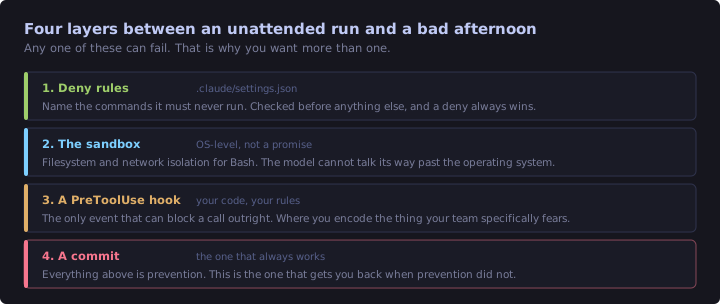
Deny rules in .claude/settings.json name what must never run. A deny always beats an allow, so this is the layer that holds even when everything else is configured loosely:
{
  "permissions": {
    "deny": [
      "Bash(rm -rf *)",
      "Bash(git push --force *)",
      "Bash(terraform apply *)"
    ],
    "allow": [
      "Bash(npm test *)",
      "Bash(npm run build)"
    ]
  }
}
That third deny is the one I care about. Editing a .tf file and applying it to a live account are different risks, and this is where the line gets drawn in a way that does not depend on anyone remembering.
Sandboxing gives the Bash tool OS-level filesystem and network isolation. It is qualitatively different from everything else here, because it is not a rule the model follows. It is the operating system refusing, and no amount of confused reasoning gets past it.
A PreToolUse hook is the only event that can block a call outright. Deny rules cover the commands you thought of. A hook covers the logic you can express: block any push to main, refuse writes outside the project directory, whatever your team specifically fears.
A commit is the layer that actually saves you. The other three are prevention, and prevention is never perfect. git checkout . is total, instant, and costs you five seconds beforehand.
Two settings worth knowing if other people use your config: permissions.disableBypassPermissionsMode and permissions.disableAutoMode make those modes unavailable. In managed settings they cannot be overridden locally.
The through-line from the first post holds. /rewind is session-scoped and will not help you tomorrow. Commit first. Everything else is a nice-to-have layered on top of that one habit.
Revision checklist
- An MCP server is an adapter between Claude Code and a tool it does not know about. Add one when you are copying and pasting from that tool.
claude mcp add, with--separating Claude's flags from the server command for stdio servers.- Scopes:
localis you and this project,projectwrites a committable.mcp.json,useris you everywhere. - MCP servers run with your credentials and their tool definitions cost context. Audit them like dependencies.
- A plugin bundles skills, agents, hooks and MCP config into one install. Worth building your own if you work across several repos.
- The status line is just a shell command that prints a string. Putting the context meter on screen beats remembering to run
/context. claude -pfor scripts and CI. Use--output-format jsonwhen a program reads it. Never pair it with a permissive mode.- Four automation tiers:
/loopfor now, Desktop tasks for local and durable, Routines for cloud and durable, GitHub Actions for repo-owned. /loopis session-scoped and expires after seven days. Routines get a fresh clone and cannot see local files.- Worktrees for risky or long work, so it never touches your working copy.
- Guardrails in order: deny rules, sandbox,
PreToolUsehook, and a commit. The commit is the one that always works.
Still not covered
Four things I have deliberately left out, mostly because I have not used them enough to have an opinion worth reading:
- The Agent SDK, for building your own agents on the same machinery rather than driving Claude Code.
- Bedrock, Vertex and enterprise gateways, which matter a lot if your employer routes inference through their own infrastructure and not at all otherwise.
- Channels, which let an external system push events into a running session instead of the session polling for them. This looks like the right answer for CI feedback and I want to try it properly before writing about it.
- Managed settings for teams, where an admin distributes configuration that individual developers cannot override.
That is the tour. Three posts, from picking a model through to running things unattended, and the honest summary is that the configuration half matters more than the prompting half. Prompts are per-session. Files are forever.