I already knew the networking concepts. IP addressing, CIDR, subnets, routing, none of that was new to me. What I had never done was build it in AWS slowly and on purpose, one piece at a time. Knowing a concept and knowing exactly which screen it maps to in the console turn out to be different things.
So instead of reaching for a video, I had an AI guide me through it step by step. Concept, a check that I understood it, build that one piece in the console, verify, then the next. What follows is that session: the concepts, the console build, and the tests that prove it works.
If you know the theory but have never wired it together in the AWS console yourself, this is written for you.
TL;DR, what we are building
A single VPC with two subnets. One public subnet that can reach the internet directly, one private subnet that can reach out but cannot be reached. A test EC2 instance in each, and the private one reachable only by hopping through the public one.
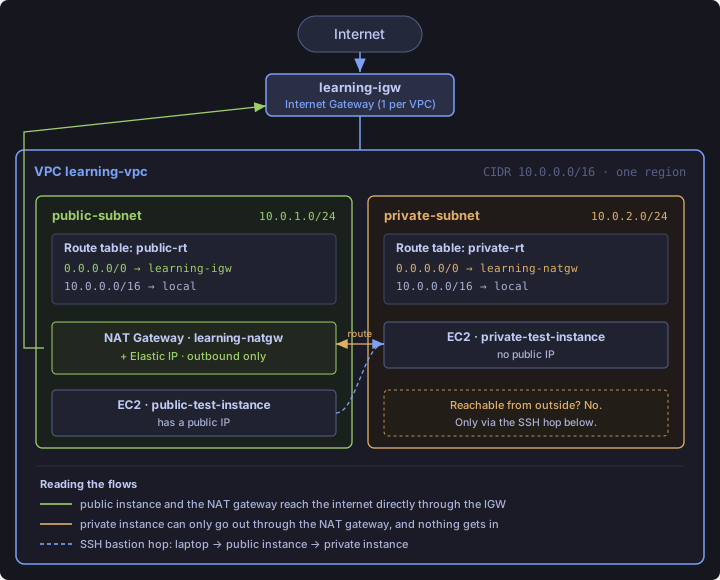
The build order is not arbitrary. Each piece depends on the one before it, so you go VPC, then subnets, then internet gateway, then the public route table, then the NAT gateway, then the private route table, then the two instances.
Part 1: The concepts
The console assumes you already know these, so they come first.
IP addresses and CIDR
An IPv4 address is always 32 bits. Four groups of 8 bits, each group written as a number from 0 to 255, separated by dots. So 10.0.0.0 is not "ten and then some zeros," it is one single 32-bit number shown in four readable chunks.
CIDR notation is worth restating precisely, because it is the part most people wave past. 10.0.0.0/16 means the first 16 bits are frozen and the remaining bits are free to vary. That is the whole idea. The number after the slash is how many bits are locked.
| CIDR | Fixed bits | Free bits | Total addresses |
|---|---|---|---|
/8 |
8 | 24 | 16,777,216 |
/16 |
16 | 16 | 65,536 |
/24 |
24 | 8 | 256 |
The math is 2 ^ (32 - prefix), and the counterintuitive part is that a smaller number after the slash means a bigger range. /8 is huge, /24 is small.
The common trap is reading /16 as "16 bits, plus 15 more, so 32." That is wrong. It is 32 total minus 16 fixed, which leaves 16 free bits, which is 2 to the power of 16, which is 65,536.
The three private ranges
There are three blocks of addresses reserved for private networks, defined by RFC 1918. They never route on the public internet.
| Range | Size | Notes |
|---|---|---|
10.0.0.0/8 |
~16.7 million | The largest. Most AWS examples carve from here. |
172.16.0.0/12 |
~1 million | Awkward. The /12 does not sit on a clean octet boundary, so the second octet only runs 16 to 31. |
192.168.0.0/16 |
65,536 | The smallest, and the one your home router almost certainly uses. |
These are not three different ways of writing the same thing. They are three separately sized pools sitting at different starting points, and you pick whichever one is big enough for what you need. AWS accepts any of them as a VPC CIDR. Starting with 10. is convention, not a rule.
What an address actually is, and the 5 that vanish
Every address in the range is a private IP that can be handed to something inside the network. An EC2 instance's network interface, a NAT gateway, a load balancer, an RDS instance. That is all these addresses are for.
One gotcha worth remembering: AWS reserves 5 addresses in every subnet. The network address, the VPC router, the DNS, one held for future use, and the broadcast address. So a /24 looks like 256 addresses but gives you only 251 usable. If you ever size a subnet down to the exact count you think you need, this is where it bites you.
The nesting rule
If the VPC is 10.0.0.0/16, every address inside it has to start with 10.0. Those two octets are frozen for the whole VPC. A subnet inside it, say 10.0.1.0/24, freezes the third octet too, so the only thing left free is the final octet for individual resources. Subnets are just smaller frozen slices of the bigger frozen block.
VPC versus subnet
A VPC is your own isolated private network inside AWS, defined by one CIDR block, and it spans an entire region. On its own it is an empty box. Nothing runs in it until you carve subnets out of it.
A subnet is a slice of that address range, and here is the part that matters: a subnet is pinned to exactly one Availability Zone, which is one physical datacenter location inside the region.
So the VPC defines your total address space across a region, and subnets divide that space into pieces, each piece living in one AZ. In production you spread subnets across at least two AZs for redundancy, a public and private pair in each. This build used a single AZ to keep it simple.
Internet gateway
The internet gateway attaches to the VPC, one per VPC, and by itself it does absolutely nothing. You attach it, and nothing changes until a route table points at it. It is like fitting a door and telling no one it is there.
A subnet only becomes public when its route table has an explicit line saying 0.0.0.0/0 -> igw-xxxx. Without an internet gateway attached, nothing in the VPC can reach the public internet at all, and that includes a NAT gateway, which needs internet reachability itself.
A quick mental model for the paths:
- A public instance with a public IP is 2 hops out: instance, internet gateway, internet.
- A private instance is 3 hops out: instance, NAT gateway, internet gateway, internet.
NAT gateway
The one line to remember: outbound yes, inbound no.
Here is what it actually does, step by step:
- The NAT gateway lives in a public subnet, not the private one. It has its own Elastic IP and its own route to the internet gateway. This is a hard requirement, because it needs to be reachable on the internet to do its job.
- A private instance, say
10.0.2.5, sends a packet to8.8.8.8. Its route table says0.0.0.0/0 -> nat-xxxx, so instead of the packet being dropped, it goes to the NAT gateway. - The NAT gateway rewrites the source IP on the packet, swapping the private address (which means nothing on the public internet) for its own Elastic IP. That rewrite is literally what "network address translation" means.
- It sends the packet out through the internet gateway. The destination sees the request coming from the NAT gateway's public IP and has no idea a private instance is behind it.
- When the reply comes back, the NAT gateway remembers which internal instance made the request and forwards the reply to
10.0.2.5.
The misconception worth stopping on
The question is this: if the NAT gateway sits in the public subnet, can someone on the internet use it to connect into a private instance?
No. That is backwards, and getting it backwards is the single most common mistake here. The NAT gateway only handles traffic that starts from the private instance and goes out. Nothing on the internet can initiate a connection in through it. There is no route and no mechanism for that to happen.
The mental model is a one-way door. A private instance can walk out, fetch what it needs, and the reply to that specific request comes back in. A stranger outside cannot walk in through the same door uninvited.
If you genuinely need inbound traffic to reach a private instance, you need a different tool for it. A bastion host, a load balancer, or a VPN.
When you actually need one
The pattern is always the same. Something lives in a private subnet for safety but still needs limited outbound access.
- Database servers. A Postgres or SQL Server box in a private subnet should never be reachable from the internet, but it still needs OS patches, time sync, or to pull a monitoring agent. That outbound traffic goes through NAT.
- Backend application servers. Web servers face customers in the public subnet, but the order-processing logic runs on private app servers. Those still need to call a payment processor like Stripe or a shipping-rate API. They initiate outward through NAT, get their response, and stay unreachable from outside.
- Private Kubernetes or ECS worker nodes. Very common. Nodes pull container images and ship logs and metrics to external services, all outbound only.
Route tables
A route table is a signpost with two columns. "If traffic is headed here" and "send it this way." Every packet leaving an instance checks this list first.
Every route table has one built-in rule you never add and cannot delete:
| Destination | Target |
|---|---|
10.0.0.0/16 (the VPC CIDR) |
local |
This is the rule that lets subnets inside the VPC talk to each other. No gateway involved, the traffic never leaves the VPC.
Everything else you add yourself. The common one is the catch-all:
| Destination | Target |
|---|---|
0.0.0.0/0 |
igw-xxxx for public, or nat-xxxx for private |
0.0.0.0/0 does not mean the address 0.0.0.0. A /0 prefix freezes zero bits, so it matches every possible IP. It is the catch-all bucket, and anything not matched by a more specific rule falls into it.
Public and private are just routing
There is no "public subnet" checkbox in AWS. Public and private are not real labels on a subnet. A subnet is public purely because it is associated with a route table whose 0.0.0.0/0 line points at an internet gateway. Point that same subnet's route table at a NAT gateway instead and it becomes what we call a private subnet. Nothing else about the subnet changes. The routing is the whole distinction.
Why is there no source column?
Everywhere else in networking you specify a source and a destination, but a route table only has a destination and a target. Why?
Because a route table is not a firewall. It does not decide who is allowed. It decides which direction a packet travels next, for traffic that has already left the instance. The source is implicit, it is whatever resource sits in the subnet this route table is attached to. The table already knows who sent the packet.
Firewall rules do have a source, because deciding who is allowed is their entire job. Two different concerns.
A couple of association rules
- Each subnet is associated with exactly one route table.
- One route table can be shared across many subnets. The usual setup is one public route table shared by all public subnets, one private route table shared by all private ones.
- A "main" route table is created automatically with the VPC and holds only the local route.
And a NAT route is not mandatory for a private subnet. A subnet is private simply because it has no route to an internet gateway. Adding NAT is optional, only worth it if instances there actually need outbound internet. Plenty of legitimate private subnets have only the local route and nothing else, like a subnet hosting an internal database that is only ever queried from inside the VPC. Fully isolated is the most secure option when it is all you need.
Security groups versus NACLs
| Security group | NACL | |
|---|---|---|
| Level | Instance (network interface) | Subnet, everything inside it |
| State | Stateful | Stateless |
| Rules | Allow only, deny is implicit | Allow and deny |
| Evaluation | All matching allow rules apply | Numbered, lowest first, first match wins |
| Can reference | Other security groups as source | IP ranges only |
| Typical use | All the real filtering | Left wide open, used for subnet-wide IP blocks |
In practice most people do all their real filtering with security groups and leave the default NACL wide open, because security groups are simpler to reason about. NACLs earn their keep for blunt subnet-wide blocks, like denying a known bad IP range for an entire subnet no matter which instance it targets.
A pattern worth adopting: reference a security group as the source rather than hardcoding IPs. "Allow port 5432 only from instances in the web-server security group" survives IP changes and reads better.
What "stateful" actually means
A real network conversation is not one packet. It is a request going out and a response coming back. Stateful versus stateless is about whether the firewall remembers that this back-and-forth is one connection, or judges every packet as a brand new unrelated event.
A security group is stateful. It keeps a connection-tracking table. If a rule let a connection in, the security group remembers that this connection was permitted, and when the reply tries to leave, it recognises it as part of an already-approved conversation and lets it out. You do not need a matching outbound rule for the reply.
A NACL is stateless. Zero memory. Every packet is judged fresh against the rule list. If an inbound request was allowed but you forgot the matching outbound rule, the response gets silently dropped and the connection breaks, even though the inbound side worked. That is a classic debugging trap, and it is worth knowing about before it costs you an afternoon.
One line to hold onto. Stateful means "allow the question in, and I will automatically let the answer out." Stateless means "I judge every packet on its own, so you have to permit both directions yourself."
If they are stateful, why do security groups have outbound rules?
Inbound and outbound rules control who can start a connection, and in which direction. Statefulness only handles the reply to a connection that was already permitted to start.
Two separate scenarios:
| Scenario | What you need | What statefulness handles |
|---|---|---|
| A user outside hits your web server on 443 | An inbound rule allowing 443 | The reply going back out, automatic |
| Your instance calls an external API or runs an update | An outbound rule allowing that traffic | The response coming back in, automatic |
So the outbound section is not about replying to inbound traffic. It is about controlling what your instance itself is allowed to initiate. AWS ships a default outbound rule that allows all traffic out, which is why most people never touch it.
Trace a sharp case through it. Inbound allows port 443, outbound has nothing, and even the default allow-all rule is deleted.
- Someone connects inbound on 443. Allowed by the inbound rule, and the reply still goes back out fine despite there being zero outbound rules, because statefulness permits the return traffic of an already-established connection. This is exactly why statefulness exists.
- The instance tries to initiate anything outbound, an API call, an OS update, even a DNS lookup. Blocked completely. That is a fresh outbound initiation, not a reply, so it needs its own outbound rule, and there is none.
The net effect is a web server that happily serves visitors on 443 but cannot reach out anywhere itself. That is not a broken config. It is a legitimate hardening pattern for an isolated server you want answering specific queries but never phoning home.
Part 2: Building it in the console
Use "VPC only" everywhere, not the "VPC and more" wizard. The wizard auto-generates the whole thing in one go, which defeats the point of placing each piece yourself.
Step 1: Create the VPC
- Console, search VPC, open the VPC dashboard, click Create VPC.
- Choose "VPC only."
- Name tag
learning-vpc. - IPv4 CIDR
10.0.0.0/16. - IPv6 CIDR block, choose "No IPv6 CIDR block."
- Tenancy, leave as Default.
- Create VPC. You get a VPC ID starting with
vpc-.
Two options here are worth explaining. For IPv6, "No IPv6 CIDR block" is the right call while learning, because IPv6 is a separate addressing system with its own longer notation and there is no reason to take that on while IPv4 is still settling in. For tenancy, Default means your instances may share physical hardware with other AWS customers, fully isolated by virtualization, and Dedicated means hardware reserved for your account alone at a much higher price. Default is what you want unless you have a specific compliance or licensing reason.
Step 2: Create the subnets
VPC dashboard, Subnets, Create subnet.
- VPC ID
learning-vpc. - First subnet, name
public-subnet, pick an AZ likeus-east-1a, IPv4 CIDR10.0.1.0/24. - Click "Add new subnet" on the same screen to do both at once.
- Second subnet, name
private-subnet, same or different AZ, IPv4 CIDR10.0.2.0/24. - Create subnet.
At this point neither subnet is public or private. They are identical. The distinction does not exist yet, and naming them public-subnet and private-subnet this early is slightly misleading, because nothing has made them so.
Step 3: Create and attach the internet gateway
- VPC dashboard, Internet gateways, Create internet gateway.
- Name tag
learning-igw, Create. - It shows as Detached. Select it, Actions, Attach to VPC.
- Choose
learning-vpc, confirm.
It exists, it is attached, and it still does nothing, because no route table points at it.
Step 4: The public route table
This step is what actually creates "public."
- VPC dashboard, Route tables. Notice AWS already made a main route table with the VPC, holding only the local route.
- Create route table, name
public-rt, VPClearning-vpc, create. - Select it, Routes tab, Edit routes.
- Add route, destination
0.0.0.0/0, target Internet Gateway, picklearning-igw, Save routes. - Subnet associations tab, Edit subnet associations, tick
public-subnet, save.
Leaving private-subnet unassociated is the entire point. That association is the line being drawn between the two subnets. The result:
| Destination | Target |
|---|---|
10.0.0.0/16 |
local (automatic) |
0.0.0.0/0 |
learning-igw |
Step 5: Create the NAT gateway
- VPC dashboard, NAT gateways, Create NAT gateway.
- Name tag
learning-natgw. - Availability mode, Zonal. That is the classic single-NAT-in-one-AZ setup. Regional is a newer feature that spreads across zones automatically, worth skipping while learning.
- VPC
learning-vpc. - Subnet,
public-subnet, not private. The NAT gateway needs its own route to the internet gateway, so it has to sit in the public subnet. This is the step people get wrong. - Connectivity type, Public.
- Elastic IP allocation, click Allocate Elastic IP to grab a fresh public IP.
- Leave the advanced primary private IPv4 blank, AWS assigns it.
- Create NAT gateway.
It sits in Pending for a minute or two while AWS provisions the real infrastructure, then flips to Available.
One console-drift note, since older walkthroughs will not match. The NAT gateway screen was redesigned recently. The Availability mode selector is new, and the subnet dropdown only appears after you pick Zonal. If you are following a video and cannot find the subnet field, that is why.
Step 6: The private route table
- Route tables, Create route table, name
private-rt, VPClearning-vpc, create. - Subnet associations tab, edit, tick
private-subnet, save. - Once the NAT gateway shows Available: Routes tab, Edit routes, Add route, destination
0.0.0.0/0, target NAT Gateway, picklearning-natgw, Save routes.
The result:
| Destination | Target |
|---|---|
10.0.0.0/16 |
local (automatic) |
0.0.0.0/0 |
learning-natgw |
The architecture is complete. The private subnet has outbound-only internet through NAT and stays unreachable from the internet inbound.
Step 7: The public test instance
EC2 console, Launch instance.
- Name
public-test-instance. - AMI Amazon Linux, free tier eligible.
- Instance type
t2.microort3.micro, whichever shows as free-tier eligible. - Key pair, create one and download the
.pem. You will reuse it for the private instance. - Network settings, Edit. VPC
learning-vpc, subnetpublic-subnet, and Auto-assign public IP set to Enable. Without a public IP, even a public-subnet instance is unreachable from outside. - Security group, create new, allow SSH port 22 from "My IP."
- Launch.
Step 8: The private test instance
EC2 console, Launch instance.
- Name
private-test-instance. - Same AMI, same instance type.
- Key pair, reuse the same one, because you will SSH into this instance from the public one using that key.
- Network settings, Edit. VPC
learning-vpc, subnetprivate-subnet, and Auto-assign public IP set to Disable. That is what actually makes it unreachable from the internet. - Security group, allow SSH port 22, but set the source to
10.0.1.0/24, the public subnet's CIDR, rather than your own IP. You will only ever reach this box by hopping through the public one. - Launch.
Setting the source to the public subnet's CIDR is a nice touch, because it encodes the bastion pattern directly into the firewall rules. The private instance will only accept SSH from inside the public subnet, by design.
Part 3: Proving it works
Test 1: The public instance reaches the internet
ssh -i hiren-test.pem ec2-user@<PUBLIC_IP>Then on the instance:
[ec2-user@ip-10-0-1-65 ~]$ curl google.com
<HTML><HEAD><meta http-equiv="content-type" content="text/html;charset=utf-8">
<TITLE>301 Moved</TITLE></HEAD><BODY>
<H1>301 Moved</H1>
The document has moved
<A HREF="http://www.google.com/">here</A>.
</BODY></HTML>

[ec2-user@ip-10-0-1-65 ~]$ ping -c 4 8.8.8.8
PING 8.8.8.8 (8.8.8.8) 56(84) bytes of data.
64 bytes from 8.8.8.8: icmp_seq=1 ttl=117 time=1.29 ms
64 bytes from 8.8.8.8: icmp_seq=2 ttl=117 time=1.33 ms
64 bytes from 8.8.8.8: icmp_seq=3 ttl=117 time=1.33 ms
64 bytes from 8.8.8.8: icmp_seq=4 ttl=117 time=1.32 ms

--- 8.8.8.8 ping statistics ---
4 packets transmitted, 4 received, 0% packet loss, time 3004ms
One reading note, because it looks like a failure and is not. The 301 Moved is not an error. Google is telling curl to use www.google.com. Getting any HTML back at all proves the connection worked, the request went out through the internet gateway and the response came straight back. The 0% packet loss on the ping confirms it cleanly. This is public-rt's 0.0.0.0/0 -> IGW route doing its job.
Test 2: The bastion hop
The private instance has no public IP, so you cannot SSH to it from your laptop. You hop through the public one. This is a real production technique called a bastion host or jump host, not a workaround.
On the laptop, copy the key up to the public instance:
scp -i hiren-test\hiren-test.pem hiren-test\hiren-test.pem ec2-user@<PUBLIC_IP>:~On the public instance, fix the permissions and hop:
chmod 400 hiren-test.pem
ssh -i hiren-test.pem ec2-user@10.0.2.<X>
chmod 400 is required, because SSH refuses to use a private key whose permissions are too open.
Test 3: The private instance reaches the internet through NAT
On the private instance:
curl google.comIt works, even though this instance has no public IP and no direct route to the internet gateway. The path is private instance, NAT gateway in the public subnet, internet gateway, internet.
Test 4: The experiment that turns correlation into causation
Test 3 shows the private instance can reach the internet, but it does not prove the NAT gateway is the reason. To prove that, delete the NAT gateway and try again.
- Delete
learning-natgwfrom the VPC console. - Wait a minute or two. Deletion is not instant, and connectivity can briefly keep working.
- Retry
curl google.comfrom the private instance.
The request hangs. No error, no response, it just sits there until you Ctrl+C.
The reason it hangs instead of erroring is worth understanding. The packet still matches the 0.0.0.0/0 -> nat-xxxx route, but the target no longer exists, so the traffic is silently dropped. Nothing ever comes back, so the client waits.
You do not even need to remove the route by hand. AWS detects that the route's target is gone and marks the entry's state as Blackhole in the route table. The entry stays visible for reference but does nothing. Blackhole is a genuinely useful state to recognise when you are debugging a dead connection in real life.
Removing the one thing providing outbound internet broke connectivity immediately. The NAT gateway really was doing the work.
Part 4: What it costs
Cost is the one thing worth watching on a personal account, so here is the honest picture.
| Resource | Cost |
|---|---|
| VPC, subnets, route tables, internet gateway | Free |
| NAT gateway | ~$0.045/hour plus per-GB data processed |
| Elastic IP attached to a running NAT gateway | Free |
| Elastic IP unattached or idle | Small hourly charge |
EC2 t2.micro or t3.micro |
Free-tier hours, then hourly |
The NAT gateway is the only meaningful cost, roughly $1/day if you leave it running around the clock. For a ten-minute break, do not even think about it. If you are stepping away for hours or days, delete the NAT gateway and release its Elastic IP, then recreate them next session. Everything else costs nothing sitting idle.
The classic trap is deleting the NAT gateway but forgetting to release its Elastic IP. That orphaned address quietly bills by the hour, because an Elastic IP only stays free while it is attached to something running. Always check the Elastic IPs page after teardown.
Revision checklist
One line per concept.
- An IPv4 address is 32 bits. CIDR
/Nfreezes the first N bits, leaving2 ^ (32 - N)addresses. Smaller N means bigger range. - Three private ranges:
10.0.0.0/8,172.16.0.0/12,192.168.0.0/16. Different sizes, not synonyms. - AWS reserves 5 addresses per subnet, so a
/24gives 251 usable. - A VPC is one CIDR spanning a region. A subnet is a slice of it pinned to one AZ.
- An internet gateway attaches to the VPC and does nothing until a route table points
0.0.0.0/0at it. - A NAT gateway lives in the public subnet, rewrites the source IP, and is outbound only. No inbound path exists through it.
- Public versus private is just routing. There is no subnet checkbox.
- A route table has no source column because it is not a firewall. Its source is implicit.
- Security groups are stateful, allow-only, per-instance. NACLs are stateless, allow and deny, per-subnet.
- Stateful means the reply to an allowed connection is let back through automatically. Outbound rules control what the instance itself can start.
- A deleted route target shows as
Blackhole, and traffic to it is silently dropped, so the client hangs. - The only real cost here is the NAT gateway, plus any orphaned Elastic IP after teardown.